

.png?width=662&height=331&name=Blog%20Google%20Ads%20Hero%20Graphic%20(600%20x%20300%20px).png)
Google Ads provides a wide variety of placements and ad formats that help brands reach their target audiences. From classic Search Ads to Video, Display, and Shopping Ads, each placement serves a unique purpose to engage users across the web. Understanding these placements and what different ads look like is essential to making the most of your Google Ads campaigns. Here’s an in-depth look at some of the most common Google Ads placements and what they look like in action.
Search Ads
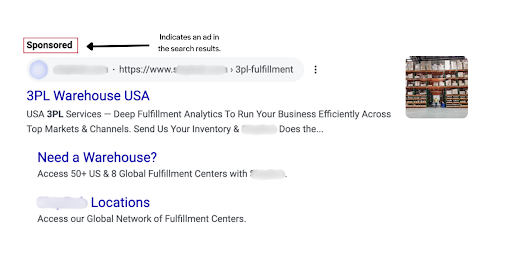
The ads that most often come to mind when somebody thinks about Google Ads are Search Ads. These are the ads that appear at the top of or within the search results page on Google. While spots at the top of Google results pages are the most coveted, Search Ads can appear, and be successful, in many different placements.
- Google Search: Search Ads on Google Search can appear at the top of the page, within search results, at the bottom of the page, and within searches on Google Maps and shopping feeds.
- Although Search Ads can appear within shopping feeds, these ads are typically shopping ads as opposed to search ads.
- Search Ads on Google Maps are often placements for location-based searches, typically useful for local business visibility.
- Search Partner Network: Websites like ask.com, Dogpile.com, and W3Schools are all part of the Google Search Partner Network and can provide additional placements for Search Ads. These partner sites change often and while they do provide additional visibility, it’s generally recommended to turn off these placements.
Search Ad Example:
Display Ads
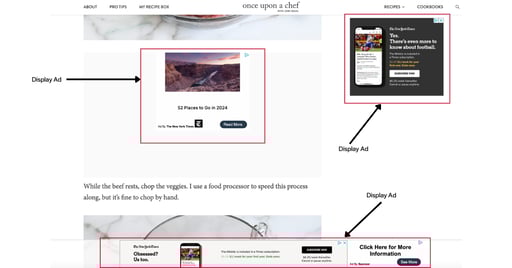
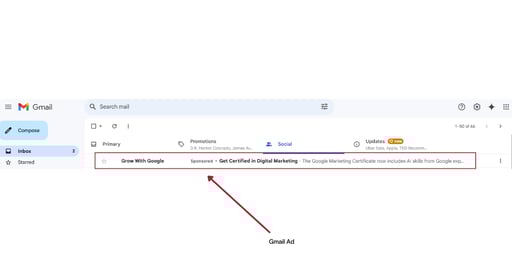
Display Ads are visual ads, and advertisers can upload assets like images, videos, logos, headlines, and descriptions. Google Ads Display Network includes ad placements on Google-owned properties like Gmail and YouTube, partner sites approved by Google, and mobile apps. For example, Display Ads could show within a news article on a Google Display Partner website or at the top of a Gmail inbox. Here are some examples of what Google Display Ads can look like:
Display Ad Example:
Gmail Display Ad:
Video Ads
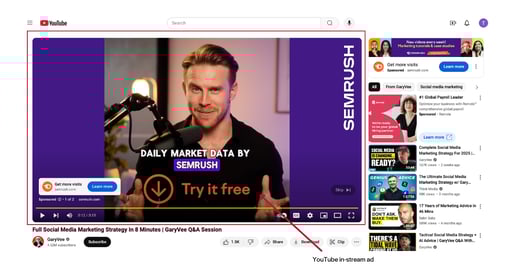
Video Ads, sometimes referred to as “YouTube Ads,” are ads that show across YouTube and Video Partner sites. Video Partner Sites are often part of the Google Display Network. There are several different types of video ads advertisers can choose from, but a few include:
- Non-skippable in-stream ads: These ads can appear before, during, or after a YouTube video and must be watched all the way through. They have a limit of 15 seconds.
- Skippable in-stream ads: Can be skipped after five seconds and can appear before, during, or after a YouTube video.
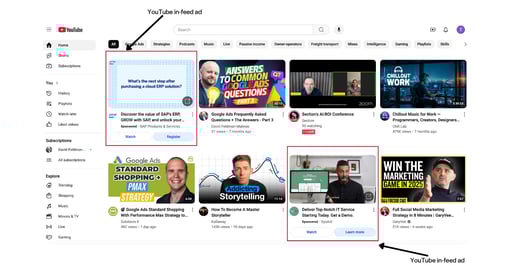
- In-feed ads: These ads show on YouTube in placements like search results, the home page, or related videos.
Video Ad Examples:
Shopping Ads
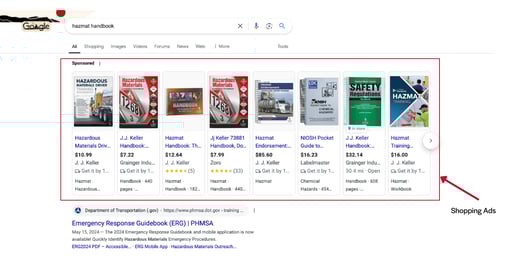
Google Shopping, or product listing ads (PLAs), show your ads on the search engine results page next to other similar products and across other Google networks like Search Partners, Display, Maps, and more. You can run these ads from standard Shopping campaigns or Google’s new Performance Max campaigns. These ads include product images, names, prices, and your store name. Here’s an example of what they look like:
FAQ
Do Google Ads placements change often?
Yes. Google continues to update ad formats and placements as AI and new technologies get built into the platform. Campaigns that are set up well today may need adjustments down the road to stay effective.
How do I know which ad format is right for my business?
It depends on your goals. Search Ads are strong for capturing demand from people already looking for what you offer, while Display and Video Ads are better suited for building awareness and telling a more visual story. A mix of formats often performs best, but the right combination depends on your budget, audience, and objectives.
What are the different types of YouTube video ad formats?
The three most common are non-skippable in-stream ads (up to 15 seconds, must be watched in full), skippable in-stream ads (viewers can skip after 5 seconds), and in-feed ads (shown in placements like YouTube search results or the home page).
What's the difference between Display Ads and Video Ads?
Display Ads are static or animated visual ads using images, headlines, and descriptions that appear on websites, in Gmail, and within mobile apps. Video Ads are exactly what they sound like: video creative that runs on YouTube and video partner sites, either as in-stream ads (before, during, or after a video) or in-feed ads (in search results, the home page, or related videos).
What are the most common Google Ads placements?
The main categories are Search Ads, Display Ads, Video Ads, and Shopping Ads. Search Ads show up on the Google search results page, Display Ads appear across Gmail, YouTube, and partner websites, Video Ads run on YouTube and video partner sites, and Shopping Ads (product listing ads) show product images and prices alongside search results.
Where do Search Ads actually appear?
Search Ads can show at the top or bottom of Google search results, within Google Maps for location-based searches, and on Search Partner Network sites like ask.com and W3Schools. Top-of-page placements are the most competitive, but ads can perform well in other spots too.
The landscape is evolving: expect change
Google Ads offers a wide range of ad placements and formats, each designed to capture attention in diverse and evolving digital spaces. While Search Ads are great at putting your brand front and center for users actively looking for your products or services, Display and Video Ads allow for more visual storytelling across Google’s network. It’s also worth noting that Google Ads are constantly evolving, with AI and new technologies driving continual updates in ad formats and placements.
As the digital advertising landscape evolves, it’s important to work with a partner who is informed and adaptable so your campaigns can efficiently leverage Google Ads for your business objectives. Want to learn more about how Google Ads might play a role in meeting your business goals or looking for a partner to work with on your existing strategy? Drop us a line.